Google Maps Ranking Checklist for Restaurants, Hotels and Shops
A clear, step by step checklist to help restaurants, hotels and local shops show up when people nearby search for what you offer.
When someone searches "café near me" or "hotel in Jaipur", the businesses that show up on the map get most of the calls, direction requests and visits. Your Google Business Profile is often the first thing a customer sees, even before your website or Instagram. The good news is that most of what helps you show up is in your control. This checklist is what we go through with every local client.
1. Get the basics exactly right
Google needs to trust that your business is real and that the details are correct. Small mistakes here quietly hold you back.
- Business name: use your real name as it appears on your signboard. Do not stuff keywords into it.
- Address and pin: check that the map pin sits on your actual entrance, not the middle of the road.
- Phone number: use a number someone actually answers during business hours.
- Hours: keep regular hours correct and add special hours for festivals and holidays.
- Website link: point it to a working page, ideally one with your menu or booking option.
Make sure your name, address and phone number are written the same way everywhere online, including your website, Instagram, Zomato, Swiggy, booking sites and directories. Consistency helps Google connect the dots.
2. Choose categories carefully
Your primary category is one of the most important choices on your profile. Pick the one that best describes your main business, for example "Café", "Dessert shop", "Resort hotel" or "Boutique". Then add a few relevant secondary categories. Do not add categories you do not truly serve, as that confuses both Google and customers.
3. Fill every section
A complete profile gives Google more to work with and gives customers fewer reasons to leave. Go through each section and fill it properly.
- Description: write a plain, honest summary of what you offer, the area you are in and what makes you different.
- Attributes: outdoor seating, Wi-Fi, parking, wheelchair access, pure veg, live music and so on.
- Menu or services: add your menu, room types or service list with clear names.
- Products: for shops, add your top products with photos.
- Booking links: add table, room or appointment booking if you have it.
4. Photos that make people choose you
People decide with their eyes. Upload real, well lit photos and keep adding fresh ones regularly.
- The outside of your building so people can recognise it when they arrive.
- The inside, showing seating, rooms or the shop floor.
- Your best dishes, rooms or products, shot clearly.
- Your team, which builds trust.
- Short videos of the space or the food being made.
Avoid stock images. Customers can tell, and it hurts trust the moment they walk in and see something different.
Pull tip: ask every happy customer for a review on the spot, with a QR code at the billing counter or on the table. A review asked for in the moment is far more likely to be written than one asked for days later.
5. Build a steady flow of reviews
Reviews matter for both ranking and trust. What helps most is a steady, natural flow of genuine reviews over time, not a sudden burst.
- Ask at the right moment, when the customer is clearly happy.
- Make it easy with a short link or a QR code.
- Never buy reviews or offer rewards for positive ones. It breaks Google's rules and can get reviews removed.
- Reply to every review, good or bad, politely and by name where possible.
- For negative reviews, apologise, explain briefly and offer to fix it offline.
If asking for reviews keeps slipping, you can automate it. A simple WhatsApp message after a visit or a checkout works well. Our AI and automation team sets up review request flows like this for local businesses.
6. Post updates and answer questions
Treat your profile like a small social page. Post offers, events, new dishes or seasonal packages. Answer questions in the Questions section, and add common ones yourself, like parking, timings or whether you take large groups. An active profile tells customers you are open, current and cared for.
Keep an eye on suggested edits too. Anyone can suggest changes to your listing, and sometimes wrong hours or a wrong phone number slip through. Check your profile regularly and correct anything that looks off.
7. Support it from your website and socials
Your Google profile does not work alone. A simple website with your location, menu or services, and a map embed gives Google more confidence. Mentions from local blogs, news, food creators and event pages help too. Instagram posts that tag your location and send people to Maps close the loop.
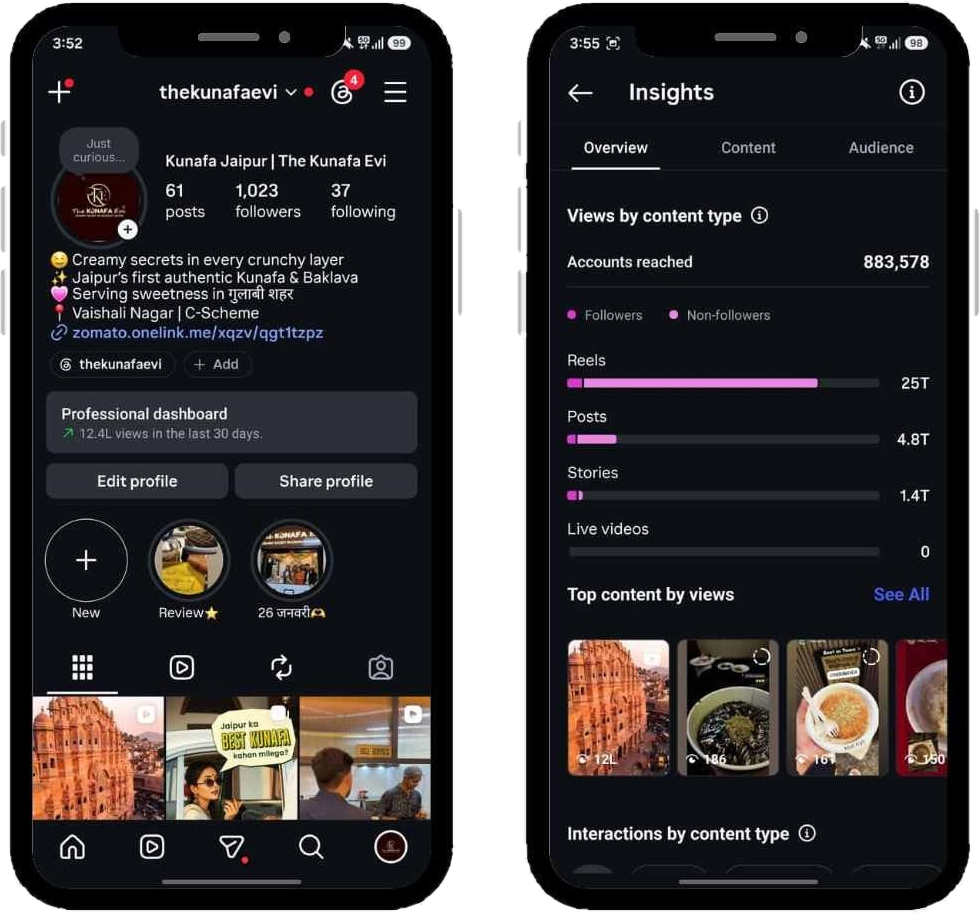
When we worked with The Kunafa Evi, a dessert brand in Jaipur, Google Maps SEO ran alongside viral reels and UGC collaborations. The brand reached 2M+ accounts on Instagram and doubled its digital presence in two months, and a strong Maps profile meant interested people could actually find the store.
A quick monthly routine
- Check hours, phone and pin are still correct.
- Add at least a few new photos.
- Publish two to four updates or offers.
- Reply to every new review and question.
- Look at calls, direction requests and website clicks in your profile insights.
If you would rather have experts handle it, our Google Business, SEO & AEO service covers the full setup and ongoing care. You can also learn more about us as a digital marketing agency in Jaipur.
Key takeaways
- Get your name, address, phone, hours and pin exactly right, and keep them consistent everywhere.
- Choose an accurate primary category and fill every section of the profile.
- Upload real photos and short videos regularly.
- Build a steady flow of genuine reviews and reply to all of them.
- Post updates and answer questions so the profile stays active.
- Support your profile with a clear website and local mentions.
Frequently asked questions
How long does it take to rank higher on Google Maps?
It depends on your competition and how complete your profile is. Fixing the basics and building reviews usually shows progress over a few months, and it keeps improving with steady effort.
Can I put keywords in my Google Business name?
No. Use your real business name as it appears on your signboard. Adding extra keywords breaks Google guidelines and can lead to your profile being suspended.
Is it okay to offer discounts for Google reviews?
No. Offering rewards for reviews goes against Google policy. Instead, ask happy customers at the right moment and make it easy with a QR code or short link.